
Accurate monitoring is the line between polished footage and an edit that sounds fine on one system, then falls apart everywhere else. The best video editing headphones should reveal dialogue noise, harsh sibilance, room tone, and bass imbalance without adding their own character.
This comparison brings together studio monitors with different designs and connection options, so you can match the listening experience to your editing setup. Keep reading to see which specifications deserve your attention first.
Key Takeaways
- Prioritize a closed-back design if you edit in shared spaces, because it limits sound leakage and helps you focus on dialogue.
- Check impedance against your computer, interface, or camera, since high-ohm headphones may need a stronger headphone amplifier.
- Choose a neutral tuning for judging voices, effects, and music, rather than a bass-heavy profile that can hide muddy low frequencies.
- Confirm the cable setup and connector size, especially if you switch between a laptop, audio interface, and field recorder.
- Favor comfortable earcups and a secure headband for long timelines, because editing sessions rarely respect the clock.
| Budget Detail Workhorse |  |
OneOdio Wired DJ Headphones | Closed over-ear design | Wired device compatibility | DJ-friendly listening profile | View on Amazon | Read Review |
| Isolation Specialist |  |
Beyerdynamic DT 770 Pro 80 Ohm | Strong external-noise isolation | Detailed studio monitoring | Comfortable over-ear fit | View on Amazon | Read Review |
| Flexible Editing Companion |  |
OneOdio A70 Wireless Headphones | Bluetooth and wired modes | Over-ear listening comfort | Useful everyday flexibility | View on Amazon | Read Review |
| Broadcast Detail Classic |  |
Sony MDR-7506 Professional Headphones | Clear dialogue monitoring | Closed-back noise control | Foldable professional design | View on Amazon | Read Review |
| Entry-Level Monitor |  |
Audio-Technica ATH-M20x Studio Headphones | Accessible studio monitoring | Closed-back listening | Computer-friendly impedance | View on Amazon | Read Review |
| Versatile Mixing Favorite |  |
Audio-Technica ATH-M50x Studio Headphones | Detailed all-purpose monitoring | Detachable cable system | Strong passive isolation | View on Amazon | Read Review |
| Spacious Open-Back Monitor |  |
Beyerdynamic DT 990 Pro 250 Ohm | Wide open-back presentation | Detailed spatial monitoring | Comfortable studio fit | View on Amazon | Read Review |
| Quiet Room Workhorse |  |
Sennheiser HD 280 Pro Headphones | Effective passive isolation | Folding storage design | Clear speech monitoring | View on Amazon | Read Review |
| Midrange Editing Pick | 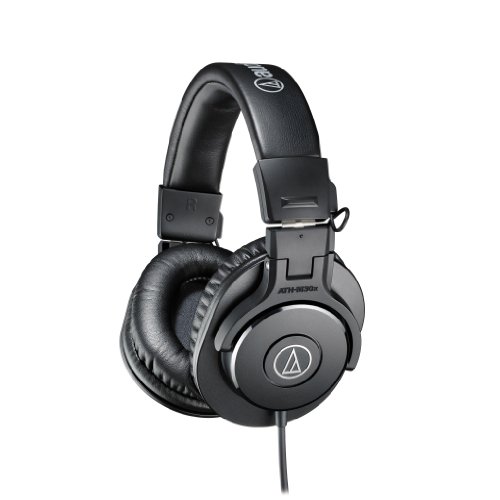 |
Audio-Technica ATH-M30x Headphones | Balanced monitoring approach | Detachable cable convenience | Practical closed-back design | View on Amazon | Read Review |
| Modern Open-Back Monitor |  |
Beyerdynamic DT 990 Pro X | Spacious open-back sound | Easier device compatibility | Detachable cable design | View on Amazon | Read Review |
More Details on Our Top Picks
-
OneOdio Wired DJ Headphones
For editors building a wired monitoring setup, these over-ear headphones offer a practical fit for PC editing, music work, keyboard practice, and guitar sessions. The closed over-ear design can help reduce nearby distractions, while the large earcups support longer timeline sessions.
The main appeal is simple wired operation, broad device compatibility, and a DJ-style presentation that suits general editing and audio review. There is no wireless mode, and the limited product information makes them less suitable when you need carefully documented studio specifications.
- Brand:OneOdio
- Design:Over-ear
- Connectivity:Wired
- Color:Black
- Additional Feature:Hi-Res audio support
- Additional Feature:DJ-style construction
- Additional Feature:PC and instrument compatibility
-
Beyerdynamic DT 770 Pro 80 Ohm
Choose these headphones for focused editing in busy rooms, where outside noise can interfere with dialogue cuts, sound effects, and detailed timeline work. The enclosed design limits sound leakage and helps keep external distractions from competing with your mix.
The 80-ohm impedance suits many computers, interfaces, and headphone amplifiers, though weaker laptop outputs may not provide the same headroom. Their studio-oriented tuning and comfortable over-ear design are strong assets, but the fixed wired format offers less flexibility than newer detachable-cable models.
- Brand:Beyerdynamic
- Design:Closed-back over-ear
- Connectivity:Wired
- Impedance:80 ohms
- Cable:Fixed
- Color:Gray
- Additional Feature:Enclosed studio design
- Additional Feature:Professional monitoring focus
- Additional Feature:Long-session over-ear pads
-
OneOdio A70 Wireless Headphones
The A70 fits editors who want Bluetooth convenience for general listening, paired with a wired connection for more serious timeline work. That two-mode approach makes it useful at a desk, during commutes, or anywhere a cable becomes an unnecessary tangle.
Its over-ear build supports a more immersive presentation, and the wired mode avoids relying on wireless transmission during critical audio checks. Bluetooth headphones can introduce latency or processing differences, so use the wired connection for precise sync decisions and final dialogue judgment.
- Brand:OneOdio
- Design:Over-ear
- Connectivity:Bluetooth, wired
- Color:Black
- Additional Feature:Hi-Res wired listening
- Additional Feature:DJ-style design
- Additional Feature:Wireless everyday playback
-
Sony MDR-7506 Professional Headphones
Sony’s MDR-7506 is a sensible pick for editors who value clear dialogue monitoring and a familiar professional format. Its closed-back construction helps keep outside noise under control, which is useful when reviewing interviews, voiceovers, and location recordings.
The large-diaphragm design supports detailed listening, while the foldable construction makes storage easier between projects. The fixed cable is less convenient for compact desk setups, and the presentation can make harsh or poorly recorded material especially noticeable.
- Brand:Sony
- Design:Closed-back over-ear
- Connectivity:Wired
- Impedance:63 ohms
- Cable:Fixed coiled
- Color:Black
- Additional Feature:Large-diaphragm drivers
- Additional Feature:Foldable earcups
- Additional Feature:Professional monitoring design
-
Audio-Technica ATH-M20x Studio Headphones
The ATH-M20x is suited to editors who need straightforward studio monitoring without a complicated feature set. Its closed-back design helps limit distractions, and the over-ear fit works well for dialogue edits, music beds, and general post-production review.
A 47-ohm impedance keeps it compatible with many computers and audio interfaces, while the angled earcups support a focused listening position. The cable is fixed, and the lower-tier construction provides fewer refinements than Audio-Technica’s more advanced studio models.
- Brand:Audio-Technica
- Design:Closed-back over-ear
- Connectivity:Wired
- Impedance:47 ohms
- Cable:Fixed
- Color:Black
- Additional Feature:Angled earcup design
- Additional Feature:Professional studio styling
- Additional Feature:Extended low-frequency response
-
Audio-Technica ATH-M50x Studio Headphones
For editors who split time between dialogue, music, and sound effects, the ATH-M50x offers a versatile closed-back monitoring platform. It provides useful detail across a broad range of material, while the over-ear design helps maintain concentration during longer sessions.
The detachable cable system is a practical advantage for studios with multiple workstations or storage needs. Its closed presentation is helpful for isolation, but it may feel less naturally spacious than an open-back model during wide ambience and room-tone evaluation.
- Brand:Audio-Technica
- Design:Closed-back over-ear
- Connectivity:Wired
- Impedance:38 ohms
- Cable:Detachable
- Color:Black
- Additional Feature:Three included cables
- Additional Feature:Foldable earcups
- Additional Feature:Circumaural studio design
-
Beyerdynamic DT 990 Pro 250 Ohm
The DT 990 Pro suits editors working in quiet rooms who want a wider, more open presentation for ambience, music, and spatial effects. Its open-back design lets sound pass through the earcups, creating a less boxed-in perspective than closed studio headphones.
That spacious character can help with stereo placement and overall balance, but it also leaks sound and provides little isolation. The 250-ohm impedance generally pairs best with a capable audio interface or headphone amplifier rather than a basic laptop jack.
- Brand:Beyerdynamic
- Design:Open-back over-ear
- Connectivity:Wired
- Impedance:250 ohms
- Cable:Fixed coiled
- Color:Black
- Additional Feature:Velour ear cushions
- Additional Feature:Professional studio construction
- Additional Feature:Wide stereo image
-
Sennheiser HD 280 Pro Headphones
Sennheiser’s HD 280 Pro works well for editors who need reliable isolation during dialogue cleanup, podcast production, and location-audio review. The closed-back structure helps separate the monitoring signal from room noise, making small vocal details easier to follow.
The folding design supports compact storage, and the 64-ohm impedance suits many studio interfaces and computer setups. Its fixed coiled cable adds reach but can feel bulky on a tidy desk, while the sound is more practical than luxurious.
- Brand:Sennheiser
- Design:Closed-back over-ear
- Connectivity:Wired
- Impedance:64 ohms
- Cable:Fixed coiled
- Color:Black
- Additional Feature:Circumaural earcups
- Additional Feature:Replaceable ear pads
- Additional Feature:Professional monitoring design
-
Audio-Technica ATH-M30x Headphones
The ATH-M30x makes sense for editors seeking balanced everyday monitoring for dialogue, music, and web video production. Its closed-back earcups help keep attention on the timeline, while the over-ear construction provides a stable fit for longer editing blocks.
A 47-ohm impedance keeps the headphones approachable for computers and interfaces, and the detachable cable improves storage and replacement options. The sound and construction are less refined than the ATH-M50x, so demanding mix work may call for a more advanced monitor.
- Brand:Audio-Technica
- Design:Closed-back over-ear
- Connectivity:Wired
- Impedance:47 ohms
- Cable:Detachable
- Color:Black
- Additional Feature:Foldable earcups
- Additional Feature:Circumaural design
- Additional Feature:Studio monitor styling
-
Beyerdynamic DT 990 Pro X
The DT 990 Pro X is a strong fit for editors who prefer open-back spaciousness but want an easier match for modern computer and interface setups. Its open construction can make stereo placement, room tone, and music beds feel more natural during detailed post-production work.
The 48-ohm impedance is more broadly accommodating than the classic 250-ohm DT 990 Pro, and the detachable cable adds practical flexibility. Sound leakage remains a major limitation, so this model belongs in a quiet room rather than beside a microphone or sleeping household.
- Brand:Beyerdynamic
- Design:Open-back over-ear
- Connectivity:Wired
- Impedance:48 ohms
- Cable:Detachable
- Color:Black
- Additional Feature:Mini-XLR cable connection
- Additional Feature:Velour ear cushions
- Additional Feature:Professional studio construction
Frequently Asked Questions
Are open-back headphones better for video editing?
Open-back headphones can be excellent for soundstage depth, stereo placement, and natural-sounding music edits because their earcups allow air to move freely. They are best in quiet spaces, since they leak sound and provide little isolation. Choose closed-back headphones if you edit near other people, work in a noisy room, or need to prevent playback from reaching a recording microphone. Many editors keep one type for detailed mixing and the other for general production work.
Do I need studio headphones for video editing?
You do not need a model labeled “studio” as long as the headphones provide clear, balanced audio, a comfortable fit, and a dependable wired connection. Marketing labels vary, so focus on sound character, build quality, and compatibility with your equipment. Avoid headphones with strongly boosted bass or exaggerated treble as your only editing reference. They can make an edit sound pleasing in the headphones while dialogue levels, music balance, or effects translate poorly elsewhere.
Is Bluetooth suitable for editing video?
Bluetooth is convenient for reviewing cuts, checking dialogue, and casual production work, but wireless latency can make lip-sync judgments less reliable. Audio codecs and operating systems may also alter the sound compared with a direct wired connection. Use a cable for precise timing, dialogue cleanup, and final mixing. Wireless headphones remain useful for mobility, but they should support a wired mode if you plan to use one pair throughout the production process.
What impedance should video editing headphones have?
For laptops, tablets, phones, and many cameras, headphones rated around 16 to 80 ohms are usually the easiest match. Higher-impedance models can work well, but they may require a dedicated headphone amplifier or audio interface to reach a suitable volume without strain. Check sensitivity alongside impedance, then confirm the output specifications of your computer or interface. If your source cannot provide enough power, the headphones may sound quiet even when their overall design is excellent.
How loud should headphones be during editing?
Keep playback at the lowest comfortable volume that lets you hear dialogue, room tone, and subtle effects clearly. A useful habit is to take a short break every hour, since ear fatigue can make balanced audio seem dull or unusually quiet. As a general safety guide, avoid sustained listening near maximum device volume and lower the level if you notice ringing, muffled hearing, or discomfort. Accurate headphones do not require excessive volume, and your ears are not replaceable studio accessories.