The best transcription headphones are not always the most expensive or most powerful. Clear speech, a comfortable fit, and a connector that suits your computer often matter more than booming bass or studio-grade specifications.
This roundup compares 10 practical headsets, from simple 3.5mm models to USB options and specialized transcription designs. Keep reading to find the details that can make long listening sessions easier and more accurate.
Key Takeaways
- Choose speech clarity over heavy bass, since crisp voices reduce listening fatigue and missed words.
- Prioritize a comfortable fit with light pressure and padding if transcription sessions regularly last several hours.
- Select USB for plug-and-play computer use, or 3.5mm for broader compatibility with laptops and transcription equipment.
- Check the cord length and connector design, especially if your workstation places the computer under a desk.
- Consider a volume control and stereo/mono switch for quick adjustments during calls, interviews, and dictation playback.
| Clear Desk Workhorse |  |
Logitech H390 USB Headset | Simple USB connection | Stereo computer audio | Noise-canceling microphone | View on Amazon | Read Review |
| Portable Listening Pick |  |
Sony ZX110 Wired Headphones | Lightweight on-ear design | Folding swivel ear cups | Broad device compatibility | View on Amazon | Read Review |
| Long-Cord Specialist |  |
Kensington Hi-Fi Headphones | Extra-long 9-foot cord | Standard 3.5mm connection | Hi-fi stereo listening | View on Amazon | Read Review |
| Minimalist Transcription Aid | 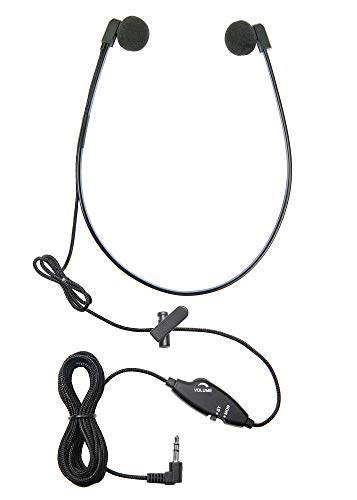 |
ECS WordHear-O Under-Chin Headset | Compact under-chin design | Standard 3.5mm plug | Easy to store | View on Amazon | Read Review |
| Straightforward PC Audio |  |
Spectra SP-PC Stereo Headset | Stereo transcription playback | Simple wired setup | Familiar computer connection | View on Amazon | Read Review |
| Cushioned Over-Ear Choice |  |
ECS WordMaster USB Headset | Direct USB connection | Padded around-ear fit | Built for long sessions | View on Amazon | Read Review |
| Convenient USB Control |  |
Spectra SP-USB Volume-Control Headset | Built-in volume control | Direct USB connection | Transcription-focused design | View on Amazon | Read Review |
| Speech Clarity Focus | 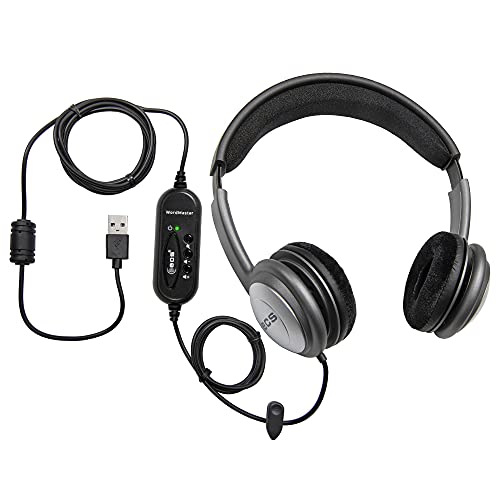 |
ECS WordSlinger USB Headset | USB computer connection | Over-head headset design | Speech clarity emphasis | View on Amazon | Read Review |
| Flexible Audio Routing |  |
VEC Spectra SP-VC Headset | Stereo and mono switching | Built-in volume control | Right-angle stereo plug | View on Amazon | Read Review |
| Recorder Companion |  |
Olympus E-103 Stereo Headset | Stereo transcription playback | Recorder-friendly connection | No battery required | View on Amazon | Read Review |
More Details on Our Top Picks
-
Logitech H390 USB Headset
For transcriptionists who work at a computer, the Logitech H390 is a practical starting point with USB-A connectivity, stereo sound, and controls positioned on the cable. The direct USB connection avoids the adapters and input juggling that can slow down a busy workflow.
Its noise-canceling microphone also suits dictation and calls, while the padded ear cups support longer listening sessions. The limitation is its fixed USB connection, which does not suit phones, tablets, or devices without a USB-A port.
- Brand:Logitech
- Headset Type:Wired stereo headset
- Connection:USB-A
- Ear Cup Style:Padded ear cups
- Cord Length:7.6 feet
- Volume Control:Inline controls
- Additional Feature:Noise-canceling microphone
- Additional Feature:Inline audio controls
- Additional Feature:Padded headband
-
Sony ZX110 Wired Headphones
Sony’s ZX110 makes sense for transcriptionists who need lightweight on-ear headphones for a laptop, tablet, or audio player. The 3.5mm plug works with a wide range of devices, and the folding design makes storage easier between assignments.
The swivel ear cups help the headphones pack away neatly, while the closed-back design can help keep spoken audio focused. The tradeoff is a basic wired setup without a microphone, inline volume control, or USB compatibility.
- Brand:Sony
- Headset Type:Wired on-ear headphones
- Connection:3.5mm plug
- Ear Cup Style:Swivel on-ear
- Cord Length:1.2 meters
- Additional Feature:Folding ear cups
- Additional Feature:Closed-back listening design
- Additional Feature:Stereo playback
-
Kensington Hi-Fi Headphones
A 9-foot cord gives the Kensington K33137 plenty of reach for desktop work, especially when the computer sits under a desk or across a workstation. The 3.5mm connection also keeps setup simple, with no software or USB port required.
The on-ear hi-fi design is suited to spoken-word playback and general computer audio, while the long cable reduces the need for extension cords. Its main limitation is the lack of a listed microphone or advanced listening controls, which keeps it focused on playback rather than full headset duties.
- Brand:Kensington
- Headset Type:Wired on-ear headphones
- Connection:3.5mm jack
- Ear Cup Style:On-ear
- Cord Length:9 feet
- Additional Feature:Hi-fi audio design
- Additional Feature:Extended desktop reach
- Additional Feature:Stereo playback
-
ECS WordHear-O Under-Chin Headset
The ECS WordHear-O is built for listeners who prefer an under-chin transcription headset instead of a traditional headband. Its compact shape can be useful in shared offices, mobile work areas, or situations where a full-size headset feels cumbersome.
The 3.5mm connection supports common computers and transcription equipment, and the design keeps the ears available without adding a large headband. The honest compromise is fit stability, since under-chin models may feel less secure during frequent movement.
- Brand:ECS
- Headset Type:Transcription headset
- Connection:3.5mm plug
- Ear Cup Style:Under-chin style
- Additional Feature:Under-chin wearing position
- Additional Feature:Wired audio connection
- Additional Feature:Compact transcription format
-
Spectra SP-PC Stereo Headset
The Spectra SP-PC suits transcriptionists who want a purpose-built computer headset with a familiar stereo format. Its design is aimed at clear playback of recorded speech, and the 3.5mm connection works with many desktop and laptop audio ports.
Because it is a simple wired model, setup is quick and dependable, with no battery charging or driver installation to manage. The limitation is that it offers less flexibility than a USB headset, particularly on newer computers that omit a traditional audio jack.
- Brand:Spectra
- Headset Type:Stereo transcription headset
- Connection:3.5mm jack
- Ear Cup Style:Stereo headset
- Additional Feature:Computer-focused design
- Additional Feature:Wired stereo listening
- Additional Feature:Transcription-oriented format
-
ECS WordMaster USB Headset
Choose the ECS WordMaster if USB convenience and a more enveloping fit matter most. Its over-head, padded-around-ear construction is designed to keep recorded speech comfortable and focused during longer transcription blocks.
The direct USB connection is useful for computers without a 3.5mm jack, and the around-ear padding can help reduce outside distractions. Its limitation is portability, since the larger over-head design takes up more space than compact on-ear or under-chin alternatives.
- Brand:ECS
- Headset Type:USB transcription headset
- Connection:USB
- Ear Cup Style:Padded around-ear
- Additional Feature:Over-head wearing style
- Additional Feature:Padded ear cushions
- Additional Feature:Computer-ready USB audio
-
Spectra SP-USB Volume-Control Headset
The Spectra SP-USB is a strong fit for transcriptionists who want USB audio with onboard volume control. Adjusting listening level from the headset is faster than reaching for operating-system controls, particularly when switching between quiet and heavily recorded passages.
Its dedicated transcription format keeps the design focused on spoken audio, while USB makes it straightforward for desktop and laptop use. The limitation is compatibility outside computers, since a standard USB headset is not as universally useful as a 3.5mm model.
- Brand:Spectra
- Headset Type:USB transcription headset
- Connection:USB
- Volume Control:Built-in control
- Additional Feature:Computer USB compatibility
- Additional Feature:Wired stereo listening
- Additional Feature:Speech-focused audio format
-
ECS WordSlinger USB Headset
The ECS WordSlinger targets transcription work with USB connectivity and an over-head fit designed for computer listening. Its stated focus on audio clarity makes it a sensible option for recorded interviews, meetings, and dictation where every syllable matters.
The wired connection avoids battery management, and the over-head format keeps the headset in a familiar position during desk work. Its limitation is that the USB-only design restricts use with phones and other devices built around a 3.5mm connection.
- Brand:ECS
- Headset Type:USB transcription headset
- Connection:USB
- Ear Cup Style:Over-head
- Additional Feature:Audio clarity design
- Additional Feature:Wired computer listening
- Additional Feature:Transcription-oriented construction
-
VEC Spectra SP-VC Headset
The VEC Spectra SP-VC is made for transcriptionists who value control over the listening signal. Its volume control and stereo/mono switch let you adjust playback for different recordings, while the twin-speaker format keeps speech easy to follow.
A 5-foot cord, right-angle stereo plug, and included storage pouch add practical touches for desk work and transport. The limitation is the 3.5mm connection, which may require an adapter on newer computers without a headphone jack.
- Brand:VEC Electronics
- Headset Type:Twin-speaker transcription headset
- Connection:3.5mm right-angle plug
- Ear Cup Style:Twin speaker
- Cord Length:5 feet
- Volume Control:Built-in control
- Additional Feature:Stereo/mono switch
- Additional Feature:Personal storage pouch
- Additional Feature:Right-angle connector
-
Olympus E-103 Stereo Headset
The Olympus E-103 is a sensible match for transcriptionists who use Olympus recording equipment or another compatible 3.5mm audio source. Its stereo format supports clear left-and-right playback, which can help preserve detail in recordings with multiple speakers or environmental sound.
The wired design keeps the headset ready without charging, and its transcription-oriented purpose makes it a natural fit for office playback. Its limitation is the absence of listed USB connectivity or advanced controls, so computer compatibility depends on an available 3.5mm audio jack.
- Brand:Olympus
- Headset Type:Stereo transcription headset
- Connection:3.5mm audio plug
- Ear Cup Style:Stereo headset
- Additional Feature:Olympus recorder compatibility
- Additional Feature:Wired audio design
- Additional Feature:Two-channel stereo playback
Frequently Asked Questions
Are wired or wireless headphones better for transcription?
Wired headphones are usually the practical choice because they do not require charging and typically introduce less audio delay. They also work well with transcription foot pedals and desktop software. Wireless headphones are suitable if you value mobility, but check battery life, Bluetooth compatibility, and connection stability before buying. A wired backup option is sensible for long assignments or deadlines.
Do I need noise-canceling headphones for transcription?
You do not always need ANC. Passive isolation or standard closed-back ear cups may provide enough background noise reduction in a quiet office. ANC becomes more useful around steady low-frequency noise, such as HVAC systems, airplanes, or public transport. It will not remove every conversation nearby, and some ANC designs can slightly alter the sound of voices.
Are over-ear headphones better than earbuds for transcription?
Over-ear headphones usually provide better long-session comfort, stronger passive isolation, and a more spacious sound presentation. They are often the better choice for several hours of work. Earbuds are smaller and easier to carry, but their fit can become uncomfortable over time, and seal quality varies from person to person. If you choose earbuds, select a model with multiple ear-tip sizes.
What sound profile is best for hearing speech?
Choose a neutral or voice-focused sound profile with clear midrange frequencies and controlled bass. Excessive bass can cover quiet syllables, while overly bright treble may make “s” sounds harsh. A model with built-in EQ can help you adjust speech clarity for different recordings. Keep the volume moderate, since louder playback can make distorted or noisy recordings harder to understand.
Can I use any headphones with transcription software?
Most headphones with a 3.5 mm plug, USB connection, or supported Bluetooth profile work with common transcription software. Still, check your computer’s ports and confirm that the software supports the connection type. If you use a USB transcription foot pedal, make sure it has a separate compatible port and that the software supports its controls. Headphones do not usually need special drivers, but USB audio models may require system permission or configuration.